Links Overview
Links enable you to customize the flow of data between the tRPC Client and Server. A link should do only one thing, which can be either a self-contained modification to a tRPC operation (query, mutation, or subscription) or a side-effect based on the operation (such as logging).
You can compose links together into an array that you can provide to the tRPC client configuration via the links property, which represents a link chain. This means that the tRPC client will execute the links in the order they are added to the links array when doing a request and will execute them again in reverse when it's handling a response. Here's a visual representation of the link chain:
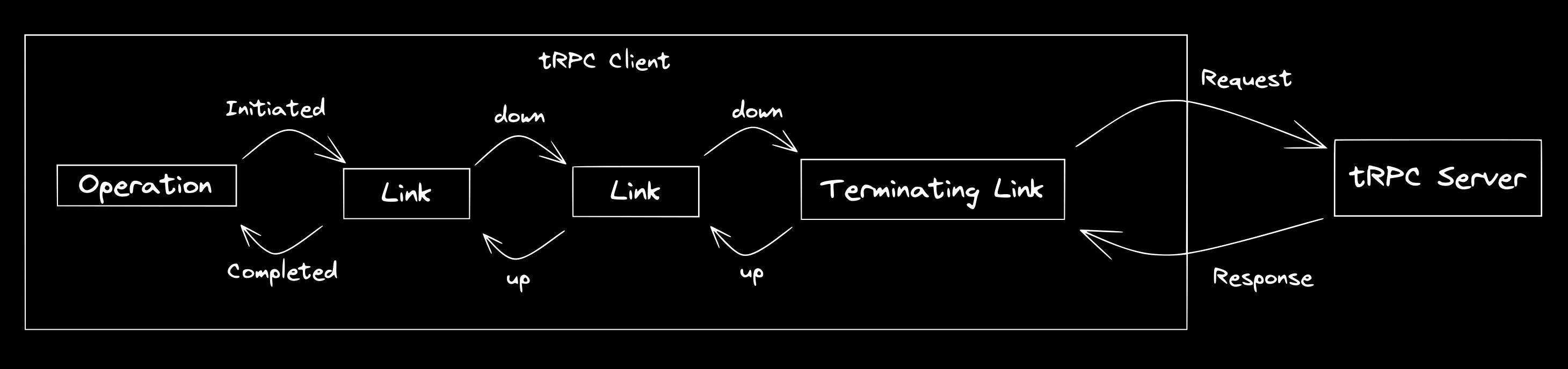 tRPC Link Diagram. Based on Apollo's.
utils/trpc.tstscreateTRPCClient ,httpBatchLink ,loggerLink } from '@trpc/client';import type {AppRouter } from './server';export consttrpc =createTRPCClient <AppRouter >({links : [loggerLink (),httpBatchLink ({url : 'http://localhost:3000',}),],});
utils/trpc.tstscreateTRPCClient ,httpBatchLink ,loggerLink } from '@trpc/client';import type {AppRouter } from './server';export consttrpc =createTRPCClient <AppRouter >({links : [loggerLink (),httpBatchLink ({url : 'http://localhost:3000',}),],});
Creating a custom link
A link is a function that follows the TRPCLink type. Each link is composed of three parts:
- The link returns a function that has no parameters. This is the setup phase where the link is initialized — it happens once per app and is useful for storing caches or other state.
- The function in step 1 returns another function that receives an object with two properties:
opwhich is theOperationthat is being executed by the client, andnextwhich is the function we use to call the next link down the chain. - The function in step 2 returns a final function that returns the
observablefunction provided by@trpc/server. Theobservableaccepts a function that receives anobserverwhich helps our link notify the next link up the chain how they should handle the operation result. In this function, we can just returnnext(op)and leave it as is, or we can subscribe tonext, which enables our link to handle the operation result.
Example
utils/customLink.tstsxTRPCLink } from '@trpc/client';import {observable } from '@trpc/server/observable';import type {AppRouter } from './server';export constcustomLink :TRPCLink <AppRouter > = () => {// here we just got initialized in the app - this happens once per app// useful for storing cache for instancereturn ({next ,op }) => {// this is when passing the result to the next link// each link needs to return an observable which propagates resultsreturnobservable ((observer ) => {console .log ('performing operation:',op );constunsubscribe =next (op ).subscribe ({next (value ) {console .log ('we received value',value );observer .next (value );},error (err ) {console .log ('we received error',err );observer .error (err );},complete () {observer .complete ();},});returnunsubscribe ;});};};
utils/customLink.tstsxTRPCLink } from '@trpc/client';import {observable } from '@trpc/server/observable';import type {AppRouter } from './server';export constcustomLink :TRPCLink <AppRouter > = () => {// here we just got initialized in the app - this happens once per app// useful for storing cache for instancereturn ({next ,op }) => {// this is when passing the result to the next link// each link needs to return an observable which propagates resultsreturnobservable ((observer ) => {console .log ('performing operation:',op );constunsubscribe =next (op ).subscribe ({next (value ) {console .log ('we received value',value );observer .next (value );},error (err ) {console .log ('we received error',err );observer .error (err );},complete () {observer .complete ();},});returnunsubscribe ;});};};
References
If you need a more real reference for creating your custom link, you can check out some of the built-in links tRPC provides on GitHub.
The terminating link
The terminating link is the last link in a link chain. Instead of calling the next function, the terminating link is responsible for sending your composed tRPC operation to the tRPC server and returning an OperationResultEnvelope.
The links array that you add to the tRPC client config should have at least one link, and that link should be a terminating link. If links don't have a terminating link at the end of them, the tRPC operation will not be sent to the tRPC server.
httpBatchLink is the recommended terminating link by tRPC.
httpLink, httpBatchStreamLink, httpSubscriptionLink, wsLink, and localLink are other examples of terminating links depending on your needs.
Managing context
As an operation moves along your link chain, it maintains a context that each link can read and modify. This allows links to pass metadata along the chain that other links use in their execution logic.
Obtain the current context object and modify it by accessing op.context.
You can set the context object's initial value for a particular operation by providing the context parameter to the query or useQuery hook (or mutation, subscription, etc.).
For an example use case, see Disable batching for certain requests.